
Syndicate


| Title | Hits |
|---|---|
| Theming the register form in Drupal 6 | 632283 |
| True or false in php | 409691 |
| Theming the contact form in Drupal 6 | 248238 |
| File download in Drupal | 212214 |
In Wordpress, unlike in Drupal, terms are not lumped together in posts. Each Wordpress vocabulary has its own “template tag”, and the ones that come out-of-the box are: the_tags(), and the_category(). The following theming tweak is about putting order in Drupal terms before they're output to screen. It you need to break up your terms by vocabulary before you display them, read on.
Here's a Wordpress blog entry:
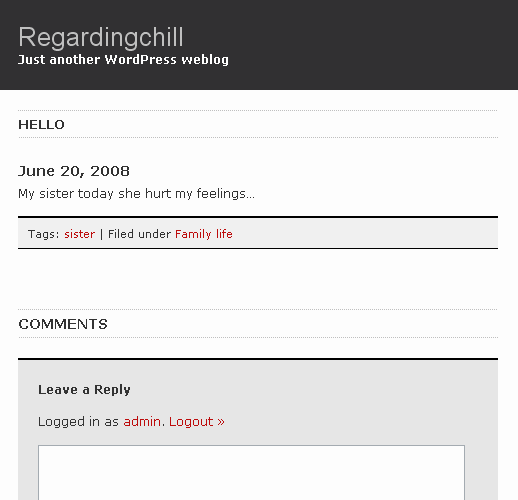
I will present an all-purpose solution that will print all terms by vocabulary. Each vocabulary list will be wrapped in its own HTML element, and I will use the vocabulary name as a 'label' for each list — a label you will be able to edit in the Administration Section of your Drupal site.
Edit template.php to rebuild your $node->taxonomy array...
... and re-theme that array into a new $terms variable... and then...
style your terms as needed in style.css.
Say you have two vocabularies, one for “free tagging”, and another for filing posts under sections, like so:
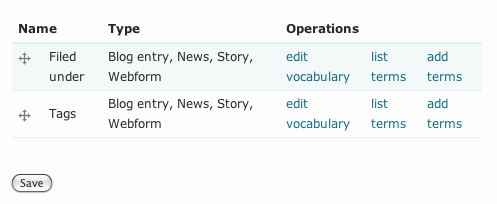
You may not like your free tags to be lumped together with your “Filed under” terms.
You may prefer to see something like this:
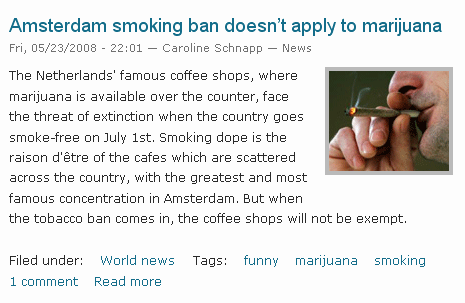
Let's get to it.
You will use a prepocess function for your node template. You will add this function to template.php if it has not already been defined. Open your theme template.php file in a text editor, and add the following code (please read the comments):
/** * Override or insert PHPTemplate variables into the node template. */ function phptemplate_preprocess_node(&$vars) { // If we have any terms... if ($vars['node']->taxonomy) { // Let's iterate through each term. foreach ($vars['node']->taxonomy as $term) { // We will build a new array where there will be as many // nested arrays as there are vocabularies // The key for each nested array is the vocabulary ID. $vocabulary[$term->vid]['taxonomy_term_'. $term->tid] = array( 'title' => $term->name, 'href' => taxonomy_term_path($term), 'attributes' => array( 'rel' => 'tag', 'title' => strip_tags($term->description), ), ); } // Making sure vocabularies appear in the same order. ksort($vocabulary, SORT_NUMERIC); // We will get rid of the old $terms variable. unset($vars['terms']); // And build a new $terms. foreach ($vocabulary as $vid => $terms) { // Getting the name of the vocabulary. $name = taxonomy_vocabulary_load($vid)->name; // Using the theme('links', ...) function to theme terms list. $terms = theme('links', $terms, array('class' => 'links inline')); // Wrapping the terms list. $vars['terms'] .= '<div class="vocabulary taxonomy_vid_'; $vars['terms'] .= $vid; $vars['terms'] .= '">'; $vars['terms'] .= $name; $vars['terms'] .= ': '; $vars['terms'] .= $terms; $vars['terms'] .= '</div>'; } } }
Here is what the preprocess function does essentially:
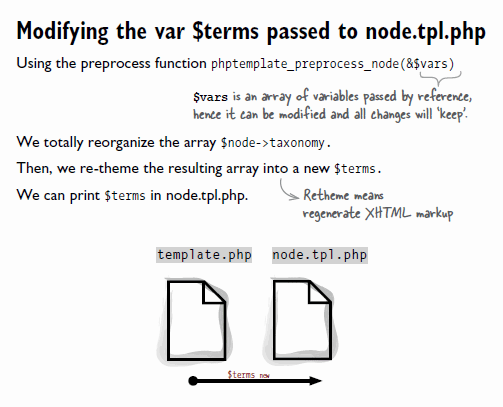
The new HTML generated from print $terms (in node.tpl.php) is shown in this Firebug screen capture:
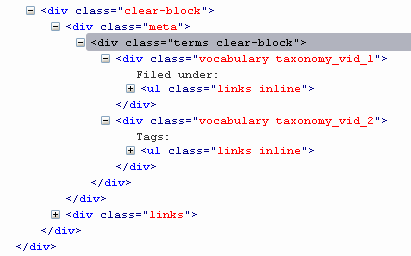
As Opusoid recommends in a comment below, you can add each vocabulary to a new variable, that you pass on to your node template. In node.tpl.php, you can output each vocabulary variable wherever you wish. It gets super easy to place each vocabulary list in a precise location in the node: above it, below it, wherever you want. Brilliant, Opusoid, thank you!
Manuee modified the code snippet above to order vocabularies by weight. This is something you'll most likely prefer to do. After all, that's what weight is all about: presentation order. His code snippet is in his comment below. Thanks manuee!
This solution will work in Drupal 6 only. Of course, there's an equivalent method for Drupal 5, and if someone asks for it I will provide it.
You may need to style your terms if you want them to appear on the same line, like so (these are rules added to the Garland theme style.css file):
/**
 * Terms styling rules
 */

.vocabulary {
  display: inline-block;
  padding-right: 1.5em;
}

.terms {
  float: none;
}

Comments
Hiding a vocabulary
You may use taxonomy for organizing your content, but may wish to NOT display terms that belong to certain vocabularies in your node. With the solution I presented, it becomes very easy to do so.
You may use CSS like so if you wish to hide terms that belong to the vocabulary with ID 4:
Or you can decide to remove this vocabulary from your $vocabulary array in your preprocess function like so:
This is such a great
This is such a great resource that you are providing and you give it away for free. I love seeing blog that understand the value. Im glad to have found this post as its such an interesting one! I am always on the lookout for quality posts and articles so i suppose im lucky to have found this! I hope you will be adding more in the future...
www.thomsoncatering.com.sg
Modifying is not an easy
Modifying is not an easy matter. In my opinion, this is one thing that can be easily done. I do not really know to use the codes required to perform these modifications. Maybe I need to be more careful in applying these codes. Breast Augmentation Houston
I use WordPress to create a
I use WordPress to create a blog that I have now. In my opinion, wordpress is the application that is easy enough to use in a blog, other than that if I have a theme or other widget, I can apply it more easily in the blog that I have. Dan Lozano
looking cool post
These are the trendy laptops that everyone wants to have. But only Panasonic 4K is different among the top 5. It weighs 5.3lbs and has no name, no release date and even a price. It's like already a computer monitor but I guess it''s handy
wedding photographers Wollongong
Great Info
Nicely presented information in this post, I prefer to read this kind of stuff. The quality of content is fine and the conclusion is advantage.
play casinos legally
thank you!
i know..right!? :)
Hamilton Beach Food chopper Reviews
I only master drupal in
I only master drupal in general only and does not mastered how to modify this application as well. In my opinion, some of the tips that you mentioned on this page can help me in understanding it. seo optimization software
Modifying owned blog look is
Modifying owned blog look is a pretty tricky thing to do because they have to apply a wide range of existing code. In my opinion, with some advice from you, I can facilitate in making these modifications. fatura ode
hello
university apparel Another excellent example of innovation, I am happy to find it. There are so several developers working on this segment but this is one of the best innovative idea ever. Thanks for sharing it here.
Nike shoes
american poker online spielen || chip runner online spielen You done certain good points there. I did a search on the subject and found nearly all persons will agree with your blog.
great
novoline forum ||
novoline für pc
I desired to leave a little comment to support you and want you a good continuation.
novoline spiele online
novoline spiele online ||
novoline tipps.A reliable blog always comes-up with new and exciting information and while reading I have feel that this blog is really have all those quality that qualify a blog to be a best one.
.I have read a few of the articles on your website now, and I really like your style of blogging.
smrting
bestseotechniques2013 || express-link-building I needed to thank you for this incredible read !! I unmistakably liked every last touch of it and I have you bookmarked to look at new stuff you post.
diyseo2013
To be honest I want to do
To be honest I want to do some modifications to web pages I have. But it seems it is quite difficult to do since I was a beginner. I do not understand how to apply the code that you are referring to on this page. Buddhist Yoga
This application seems
This application seems important enough to be shared by the computers. If this application has been shown to provide benefits to internet users, I think there is no harm if we try this application. Lakeway dentist
easy-creditmaxx.de
Easy-CreditMaxx.de It is a great project. It does not only broader the sphere of interests but also gives an opportunity to make friends with people who share your interests.
The solution you provided in
The solution you provided in this page is quite good and effective. I've tried the solution you provide in the blog that I have. I am a novice in the field of computer and also the blog world so I need a lot of reference to develop a blog that I have. Torpedos Gratis
Most university, college and
Most university, college and high school students cheap essay writing service have benefited from having a coach at some point in their lives, either as a member of sports team, or as a participant in an individual sport.
This was really interesting
This was really interesting info in this blog that to very happy for the nice technology in this blog. I am really admired for this info in this blog that to very much enjoyed for the great technology in this blog. It was searching the nice approach is visible in this blog that to way of presentation is really great. I am really thank you very much for the nice info in this blog that to utilize the nice info in this blog.
I am a considerable amount
I am a considerable amount captivated by examining articles. This site was positively a breathtaking site which I had never revealed it at whatever location. Loads of stuff in this site ! Genuinely strong for the more amazing part of them ! link-building-4panda
Module?
If you'd like others to also be able to easily display their terms grouped by vocabulary, it shouldn't be too hard to implement your code into a contrib module. Especially in Drupal 6, now that you can provide .tpl.php and _preprocess theme functions along with your module, as well as some default CSS styling.
Also, note that taxonomy_get_vocabulary() was renamed to taxonomy_vocabulary_load() in Drupal 6, because the new menu system automagically calls _load functions under certain naming conditions. In this case, The D6 taxonomy module defines the menu item 'admin/content/taxonomy/edit/vocabulary/%taxonomy_vocabulary'; as such, the menu system automagically calls 'taxonomy_vocabulary_load()' (by concatenating the string after the '%' in the menu item, with the string '_load'), when the callback for editing a vocabulary is invoked.
Plus, there are cleaner ways to hide terms from a specific vocabulary, than to hard-code excluded vid's in your site's theme. As a simple alternative, you could define a variable 'taxonomy_hidden_vocabularies', which would be an array of vocabulary IDs that your theme would refer to. For a more complex approach, have a look at the category module, which (as well as a million other things) lets you hide specific vocabularies from view (using the category_display sub-module). Note that I'm the author of this module, so I'm biased - the module is big and complex, and it isn't appropriate in many situations. A simple task like hiding specific vocabularies is NOT enough reason to consider using it!!
Nope
In this case, a module is not the best solution. If it's not a good solution for me, I do not consider it a good solution for others. A module is overkill here. This is a tweak. The tweak takes an array that has terms flattened and give it 2 dimensions. Re-theme. Nothing more.
I am a themer just as I am a module developer. I like to show people how to leverage what they see on the page within their theme — and show them how they have full control. Using the preprocess function, it is possible to rename labels, change whether you'll put : [colon] between the label and the list, and you can also create as many variables as you have vocabularies, and print them at different locations in the node view. So you could show the tags in one location, and the terms belonging to another vocabulary somewhere else. Say you have an e-commerce/ubercart site and have faceted vocabularies, like so:
By Garment
Blouse | Skirt | Jacket | Pants
By Color
Red | Azure | Green | Ash | Beige
By Fabric
Cotton | Wool | Rayon | Silk | Linen
You may want to iconize each term based on its vocabulary: garment, or color, or fabric.
So that's the reason! Thank you for the insider info.
I disagree. By the way, the part about hiding a vocabulary is not the GOAL of this theming exercise. It is simply something that is facilitated... as a side effect. That's why I mention it in a comment. Creating a variable in the theme? For whom? The person who will need to modify that variable is the same person who can do unset(..) in the preprocess function. Some people ask for these tweaks: hide this link, hide this term, etc. It is entirely clean and kosher.
Amen.
No effect
I'm new at drupal and I've tried to add your phptemplate_preprocess_node funtion in my theme template.php file, but afterwards it takes no effect. The themes variable remains the same in node.tpl.php. I've also tried to create a new variable $vars['myterms'] but it isn't passed to node.tpl.php.
Do I miss anything? It may be some other module that interferes?
Thank you in advance.
Would be easier if it is not
Would be easier if it is not too much code that needs to be applied in this application. In my opinion, too many formats and codes will only make the user feel confused and often make mistakes. recuperação de dados
looking cool post
It is a sensible blog. Come on, man it. You've got so much know-how about this issue, so significantly interest. You additionally realize how to make folks rally guiding it, naturally from your replies. Youve obtained a design and style the following that is not necessarily also showy, however helps make a declaration the size of exactly what youre saying. Best wishes, really.
шины для погрузчиков
I am somewhat confused as to
I am somewhat confused as to edit the website that I have. In my opinion, this is a pretty tricky thing to do because to do the editing process, we must have the ability to understand the code and apply it appropriately. herb infused olive oil
Sorry...
Sorry... I've missed to clear the cache...
Thank you for your precious tutorials, I'm learning a lot from them.
No worries
Clearing the cache is a common thing we forget when theming Drupal 6.
THEMENAME_preprocess_node()
I guess it would be even more drupalish to use THEMENAME_preprocess_node() instead of phptemplate_preprocess_node().
Nevertheless thanks heaps for sharing! Cheers.
In theory for Drupal 6, maybe more drupalish
Both ways are fine, actually. However, take note of this: if you create an other theme for which this theme is your base theme, and you have named your function THEMENAME_preprocess_node() in your base theme, the tweak won't be passed down to the child theme, due to a yet unfixed bug as per the current Drupal 6 distribution, 6.5.
It's been recommended to use the THEMENAME prefix in the Drupal 6 theming guide on Drupal.org (while it was recommended to use the engine prefix in Drupal 5) because of the new theme inheritance — if only that worked properly (but it will in Drupal 6.6). Using the PHPtemplate_ prefix makes your code more portable, but if you are working on a child theme where there's already a function that uses the engine prefix in the parent theme, you will get a PHP error for redefining the same function if you still use the theme engine prefix in the child theme. For now, this is what I do: I use the engine prefix in base themes, and use the THEMENAME prefix in derivated themes.
very exciting tutorial
very exciting tutorial - thank you very much!!
Exciting, eh?
Thank you :-D
Show some love for Drupal 5
We're still using Drupal 5 on our website (due to Panels, mostly.)
I'd really love to be able to use this feature, as right now, ALL terms are being shown on a node, and it rather sucks.
http://thebruns.ca/content/reds-dominate-fall-classic (see the bottom)
I'm trying to create bylines for nodes instead, and that's what led me to this wonderful little tut.
I'm trying to get this to work, but even after replacing taxonomy_vocabulary_load(vid) with taxonomy_get_vocabulary(vid), nothing changes.
I don't have performance caching enabled.. any help?
Yes please!
> This solution will work in Drupal 6 only. Of course, there's an equivalent method for Drupal 5, and if someone asks for it I will provide it.
Along with the previous commenter, I for one would really appreciate the D5 solution.
And just as a side note: having this as a module would be great - but then again I currently don't have a life outside of Drupal, and I know it'll be a learning experience :)
PS you make Previewing comments mandatory, OK but why captcha both then and when Posting?
Term Description?
HI.
I'd like to also display the description of the terms and then change the formatting a little to create a table (or list) with the terms on the left and the description of the term on the right.
Could you point me in the right direction?
thanks,
Sean
If you need code for this
If you need code for this, please request a quote on this page. I will get back to you shortly.
My fees for Drupal development and theming are 50$ US per hour.
Thank you Caroline!! Very
Thank you Caroline!! Very easy to apply and works wonderfully! I've linked to this article from this handbook page which hasn't been updated for Drupal 6 yet: http://drupal.org/node/42680.
Module
There is a module that does the same thing http://drupal.org/project/term_display
The method shown here is nice too. It is the one i'm using right now because i plan to play with the function to hide terms that are not important enough to list but important enough to tag the node with (using cck)
Vocabulary Weight
This is a great solution, but I notice it doesn't respect the vocabulary weight for the order of the vocabulary. How would you do this?
This is a great article! I
This is a great article!
I am curious, how would one go about creating a proper hierarchical viewpoint of terms so Taxonomy: Term 1 >> Subterm 1 >> Subterm 2 >> etc ?
I'm figuring I'd have to make a call to taxonomy_term_path($term), but I'm not sure where to go from there.
Awesome
Your tutorial is magically delicious. ;)
(It has been tough finding readable instructions and understandable code)
In case anyone's a lurking beginner like me: I did end up splitting the 2D array into a few array variables so I could put my "Categories" in one place in my layout and my "tags" in another. Very easy:
In template.php, after iterating through and building the 2D array, I wrote this:
$vars['tags']= theme('links',$vocabulary[4], array('class'=>'links inline'));

$vars['categories']= theme('links',$vocabulary[3], array('class'=>'links inline'));
If you're not sure what your vocab id (the index) is, hover over the "edit vocabulary" link in Admin/Taxonomy
and check your status bar.
Brilliant idea, Opusoid.
That's brilliant. Adding these 2 variables to pass on to your template. It becomes super easy to place $tags and $categories in very different locations... in precise locations in the node's HTML. Thank you for this. I will edit the tutorial to link to your comment.
Aw shucks!
It's all by the seat of my pants, so this is huge validation for me, Caroline - cheers!
:D
Chris
No, cheers to _you_, Chris.
No, cheers to _you_, Chris. I edited the tutorial with a link to your comment.
Great articles and great
Great articles and great layout. Your blog post deserves all of the positive feedback it’s been getting.
AFLOdds
I recently found many useful
I recently found many useful information in your website especially this blog page. Among the lots of comments on your articles. Thanks for sharing.
lady gaga boletos
Thanks for sharing this
Thanks for sharing this quality information with us. I really enjoyed reading. Will surely going to share this URL with my friends.
http://freevideoloops.net/getting-great-free-royalty-free-music-for-your-video-games/
Help please
Could someone please tell me at which point I need to add:
$vars['tags']= theme('links',$vocabulary[4], array('class'=>'links inline'));$vars['categories']= theme('links',$vocabulary[3], array('class'=>'links inline'));
in template.php? Where have we built the 2nd array?
Thanks, and I'm really sorry if this is hijacking this thread.
Help with...
I can't get Opusoid's idea to work; where to edit the code for his idea to work?
Place those two lines of
Place those two lines of code just below the $vars['terms'].
works great in drupal 6
Thanks for that solution - works great on drupal 6
cheers, sel
This is a great
This is a great documentation. Thank you for taking the time to share this. Also Opusoid's idea is brilliant.
Keep up the good work...
That's really sweet of you...
to give me this positive feedback.
It takes me a long time to write these tutorials. I wish I was a quick writer. There's so much I want to write about. Not just tuts on Drupal but tuts on Rails / Ruby / Regular Expressions / jQuery and of course Shopify. It takes me no time to reply to someone on a forum, I can even go and test the code first, whatever snippet I provide. But whenever I sit down to write a tut... different story.
Maybe I should develop a quicky style of tut.
Creating valuable things
Creating valuable things takes time. I think it is why you are taking much time to create these valuable tutorials :) Many people benefit from them...
Thanks again...
Sinan
Very nice article, I enjoyed
Very nice article, I enjoyed reading your post, very nice share, I want to twit this to my followers. Thanks!.
iPod Touch 3G jailbreak here
Thank you!
Thanks for this tutorial - it worked very nicely! I used Opusoid's modification as well, so that I could have more control over the display of the category and the tags, so thanks to both of you!
Vocabulary weight doesn't work.
I've noticed that vocabulary weight doesn't work with this. Does anyone know how to sort the way they appear?
Example:
Tags (ID 10) has a weight of 0 and Category (ID 15) has a weight of -1 but they display as such:
Tags: term1, term2
Category: term1, term2
Switching the vocab weight does nothing, I expected it to looks like this.
Category: term1, term2
Tags: term1, term2
here's a quick modification to take the weight into account
To tell you the truth, we should write a patch to taxonomy module, I don't see any situation where different vocabularies would WANT to show in a big blob of links with no classification.
Thanks for the article btw!
Seems like your code is the same as mine
What's the difference?
My code:
Your code:
A few things changed, do a
A few things changed, do a diff. Verified, this new example correctly displays the weight.
Oh yeah
I see it now, thanks.
In the tutorial I will add a link to your comment if you don't mind.
Done.
Thanks again.
Sure no problem
As far as what I did, basicaly I add another layer to the arrays, with the key of the weight so that when we sort it we use that instead of the vid.
$vocabweight = taxonomy_vocabulary_load($term->vid)->weight;then use it before when setting the array
$vocabulary[$vocabweight][$term->vid]....After that i just adjust the rest of the code when building the links etc. by diggin one more level down:
Glad you found it useful, not the cleanest way to do it i'm sure, but hey, it gets the job done =)
Patch! Patch!
YES. Very much agreed!
Or if for some reason the powers that be don't want that, maybe it could be an add-on module?
Oh yesss
I agree wholeheartedly.
// If we have any terms...
// If we have any terms...
if ($vars['node']->taxonomy) {
// Let's iterate through each term.
foreach ($vars['node']->taxonomy as $term) {
// We will build a new array where there will be as many
// nested arrays as there are vocabularies
// The key for each nested array is the vocabulary ID.
$vocabweight = taxonomy_vocabulary_load($term->vid)->weight;
$vocabulary[$vocabweight][$term->vid]['taxonomy_term_'. $term->tid] = array(
'title' => $term->name,
'href' => taxonomy_term_path($term),
'attributes' => array(
'rel' => 'tag',
'title' => strip_tags($term->description),
),
);
}
// Making sure vocabularies appear in the same order as the weight
    ksort($vocabulary, SORT_NUMERIC);
// We will get rid of the old $terms variable.
unset($vars['terms']);
// And build a new $terms.how to repair ps3 | repair ps3
foreach ($vocabulary as $vocabweight => $vid) {
      foreach($vid as $vid => $terms) {
// Getting the name of the vocabulary.
$name = taxonomy_vocabulary_load($vid)->name;
// Using the theme('links', ...) function to theme terms list.
$terms = theme('links', $terms, array('class' => 'links inline'));
// Wrapping the terms list.
$vars['terms'] .= '
$vars['terms'] .= $name;
$vars['terms'] .= ': ';
$vars['terms'] .= $terms;
$vars['terms'] .= '
';
}
}
}
Thanks
Thank you so very much for this tutorial.
Drupal is a mixed blessing for the newbie coder, but it's because of members of its community (like yourself) that we beginners not only stick with it despite of the long hours of blankly staring at PHP code we don't understand, but also grow thirsty to learn how to do more with it.
I hope to one day be able to help Drupal beginners in the way that you helped me today. You're solidly in my bookmarks, Schnapp.
P.S.: Also thank you to Opusoid and manuee for their modifications.
Vocab Labels not wrapped in own HTML
The vocab names are not wrapped in any of there own HTML, making it a little difficult to style them, so I changed the code (that took into consideration weights) so that it had a span with a class of "label" around it. Thanks for the great info! And +1 for the patch. Here it is:
Works great!
This is amazing, your code solved my issue. I had a custom content type (using CCK) that had tags but the main category term was being thrown in with the tag listing which I did not want.
I thought this was going to be a needle in a haystack trying to find a solution but after a 30 second Google search I found this article, thanks again!